SAP Agentic AI Learning Pathway
Aligned to the SAP Agentic AI North Star Architecture, with a parallel home-lab pathway

Prepared by Bob Panic July 2026. All links verified as active at time of writing.
How this pathway is organised
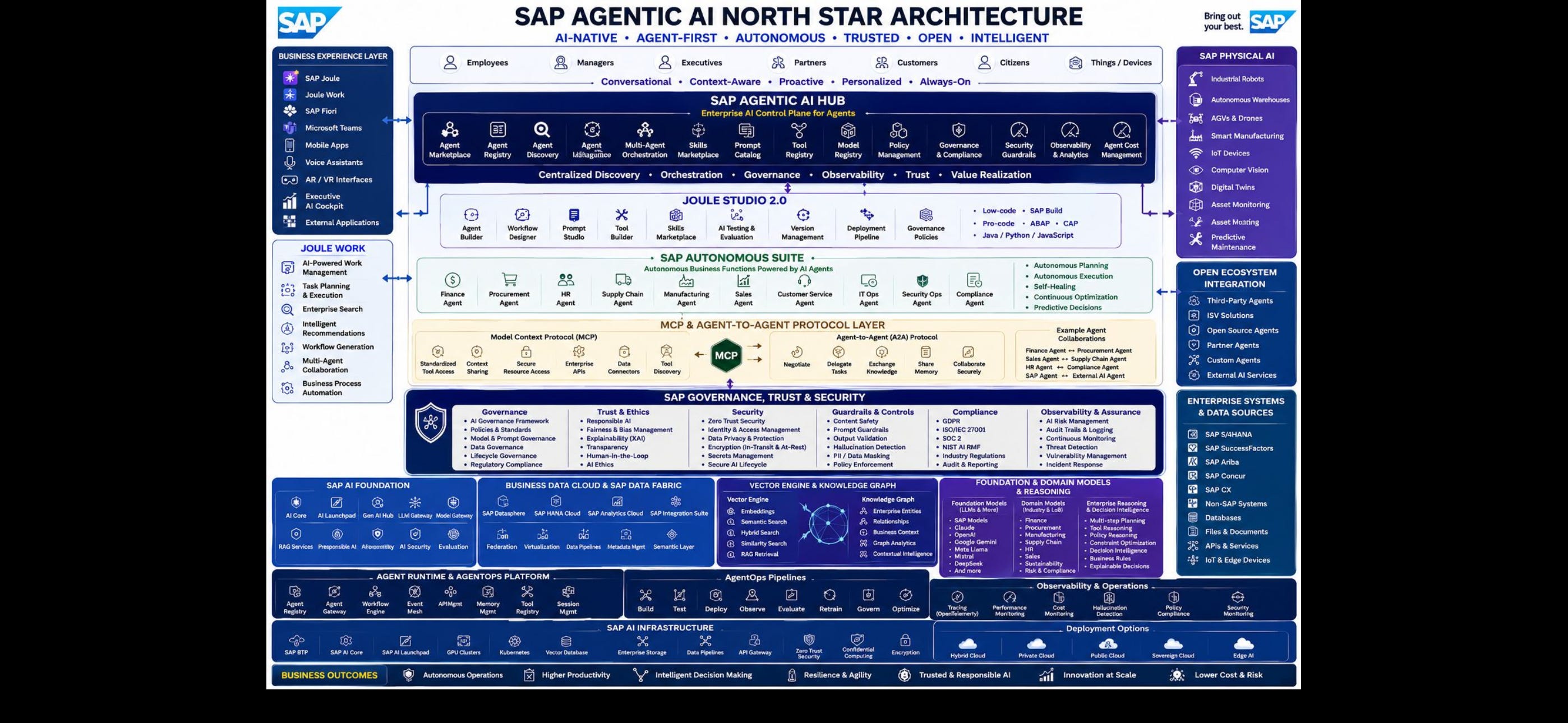
The North Star Architecture diagram stacks eight capability layers: the Business Experience Layer (Joule, Fiori, Teams), the Agentic AI Hub, Joule Studio 2.0, the Autonomous Suite of business-function agents, the MCP and A2A protocol layer, Governance/Trust/Security, the AI Foundation (AI Core, Generative AI Hub, vector engine, knowledge graph), and the underlying infrastructure and AgentOps platform. This pathway works through those layers in the order a delivery practitioner should learn them: strategy and experience first, then the build tooling, then the protocol plumbing, then governance, then the platform foundation, finishing with certification.
Part A is the full pathway mapped layer by layer to the diagram. Part B is the home-lab pathway, built entirely from trials, free tiers, and open-source tooling, because SAP Build agent deployment, productive Joule tenants, and the Autonomous Suite all sit behind corporate licences that an independent consultant cannot access from home. Part B is honest about where the licence wall sits and routes around it.
A realistic cadence for someone working around client engagements is eight to ten hours a week for roughly sixteen weeks. Phases 1 and 2 are prerequisite knowledge for everything else; Phases 3 to 6 can be reordered to suit whichever client conversation is most imminent.
PART A: The full pathway, layer by layer
Phase 1 (Weeks 1–2): Business Experience Layer and SAP’s AI strategy
Everything in the diagram hangs off Joule as the front door, so start with the strategic framing before touching any tooling. All courses on learning.sap.com are free with a basic SAP Universal ID registration.
Begin with Introducing Joule (https://learning.sap.com/courses/introducing-joule), which covers the full Joule ecosystem exactly as the diagram’s Business Experience Layer presents it: Joule Work, Joule Assistants, Joule Agents, and Joule skills, plus the commercial model including what Joule Base gives away free with any SAP cloud subscription. Follow it with Boosting AI-driven Business Transformation with Joule Agents (https://learning.sap.com/courses/boosting-ai-driven-business-transformation-with-joule-agents), which connects Joule agents to SAP Business Data Cloud and the SAP Knowledge Graph, both of which appear in the diagram’s data foundation layer.
Given your HCM and finance delivery background, add Demonstrating SAP Joule in Finance (https://learning.sap.com/courses/demonstrating-sap-joule-in-finance). It is the best available worked example of Joule grounded in a line-of-business context, and the setup and navigation content transfers directly to SuccessFactors scenarios.
Close the phase with the consolidated TechEd AI learning collection (https://learning.sap.com/teched/ai-and-Joule), which SAP maintains as its curated index of Business AI content and which you should bookmark as your ongoing reference page.
Outcome: you can explain the top three layers of the diagram (experience layer, Agentic AI Hub, Autonomous Suite) to a client steering committee without notes, and you can articulate the difference between a Joule skill (predefined, single-operation, no reasoning) and a Joule agent (multi-step, reasoning, adaptive), which is the distinction the whole architecture turns on.
Phase 2 (Weeks 3–5): Joule Studio 2.0 and the build layer
Joule Studio is the diagram’s development layer: agent builder, workflow designer, prompt studio, tool builder, and the low-code to pro-code spectrum. SAP announced Joule Studio’s evolution into a unified managed environment supporting both low-code and pro-code development, with MCP and A2A used to connect agents across SAP and non-SAP landscapes. The product page (https://www.sap.com/products/artificial-intelligence/joule-studio.html) has a trial waitlist signup worth registering for.
Work through Introducing Joule Studio in SAP Build (https://learning.sap.com/courses/introducing-joule-studio-in-sap-build), a free course of roughly one hour that covers skill and agent building conceptually. Then go hands-on with the official tutorial Use Joule Studio to Create an Agent (https://developers.sap.com/tutorials/joulestudio-agent-create..html), which builds a maintenance-planner agent checking material stock availability against a CAP backend. That scenario is worth internalising because it is structurally identical to the payroll and HCM validation agents you would propose to clients: an agent reasoning over skills that call backend APIs through configured destinations.
The SAP Discovery Center mission Build custom AI Agents with Joule Studio, classic edition (https://discovery-center.cloud.sap/missiondetail/4665/) is the step-by-step implementation guide, and the full Joule mission catalogue (https://discovery-center.cloud.sap/missionCatalog/?search=joule) covers Joule activation for SuccessFactors, S/4HANA, Ariba, and IBP. Read the SuccessFactors mission closely even without a tenant to run it against; it is the exact activation sequence your HCM clients will need, and knowing it cold is a credibility asset.
SAP is currently running a promotional offer letting teams run custom Joule agents with zero execution costs through 31 May 2026, per the SAP Community getting-started guide (https://community.sap.com/t5/tooling-sap-build-blog-posts/how-to-get-started-with-joule-studio/ba-p/14152855). That date has now passed, but the post remains the clearest explanation of the licensing model: custom skills carry no orchestration cost, agents are metered, and document grounding requires an SAP AI Core licence.
Outcome: you can design an agent (persona, instructions, tools, skills, grounding) and explain the commercial mechanics of deploying it, which is precisely the gap most SAP delivery leads cannot fill.
Phase 3 (Weeks 6–8): MCP and A2A, the protocol layer
The yellow band in the middle of the diagram is where the industry is converging, and it is also the layer you can master completely from home because both protocols are open standards. MCP (originated by Anthropic) handles agent-to-tool communication; A2A (originated by Google, now a Linux Foundation project with SAP as a founding contributor) handles agent-to-agent communication. The diagram’s example collaborations, such as HR Agent to Compliance Agent and SAP Agent to External AI Agent, all run over A2A.
For MCP, take Anthropic’s own free courses in sequence: Introduction to Model Context Protocol (https://anthropic.skilljar.com/introduction-to-model-context-protocol) builds MCP servers and clients from scratch in Python and covers the three primitives of tools, resources, and prompts, then Model Context Protocol: Advanced Topics (https://anthropic.skilljar.com/model-context-protocol-advanced-topics) covers sampling, notifications, roots, and the STDIO versus StreamableHTTP transport decision that matters for production deployment. Supplement with the free Hugging Face MCP course built in partnership with Anthropic (https://huggingface.co/learn/mcp-course/en/unit0/introduction), which adds graded assignments and a certificate at roughly three to four hours a week over several units.
For A2A, the canonical starting point is the Linux Foundation project repository (https://github.com/a2aproject/A2A), which links the full specification, documentation site, and SDK repositories including a2a-python with working samples. The structured course is A2A: The Agent2Agent Protocol on DeepLearning.AI (https://www.deeplearning.ai/courses/a2a-the-agent2agent-protocol), built with Google Cloud and IBM Research, in which you build a healthcare multi-agent system with three agents on different frameworks, wrap each in an A2A server, and orchestrate them. Swap the healthcare framing for a payroll exception-handling scenario in your head as you go and you have a client demo.
Outcome: working code. You will have built MCP servers, MCP clients, and an A2A multi-agent system on your own machine, which puts you ahead of the large majority of SAP practitioners who can only talk about this layer.
Phase 4 (Weeks 9–10): Governance, trust, and security
The governance band of the diagram maps SAP’s Responsible AI framework against GDPR, ISO/IEC 27001, SOC 2, and the NIST AI Risk Management Framework. For a consultant selling into Commonwealth and regulated environments, this layer is arguably your strongest differentiator, since it connects directly to your benchmarking and assurance practice.
Search learning.sap.com for the AI ethics and Responsible AI content (the catalogue search at https://learning.sap.com is free), and pair it with primary sources: the NIST AI RMF itself (https://www.nist.gov/itl/ai-risk-management-framework) and SAP’s AI ethics policy pages, which you have already touched in your SuccessFactors Trust Center verification work. The diagram’s guardrails column (content safety, prompt guardrails, hallucination detection, PII masking, policy enforcement) is implemented technically in the Generative AI Hub orchestration service, so you will meet it hands-on in Phase 5 rather than just conceptually here.
Outcome: a governance narrative that ties the diagram’s compliance column to Australian procurement expectations, ready to drop into VfM and assurance deliverables.
Phase 5 (Weeks 11–13): AI Foundation, Generative AI Hub, and the data layer
This is the blue and purple foundation of the diagram: SAP AI Core, AI Launchpad, the Generative AI Hub with its multi-model access (the diagram lists SAP models, Claude, OpenAI, Gemini, Llama, Mistral, DeepSeek), and the vector engine and knowledge graph.
Start with the Generative AI Hub trial (https://www.sap.com/products/artificial-intelligence/generative-ai-hub-trial.html), which SAP runs as a guided experience covering prompt design in AI Launchpad, RAG over the SAP HANA Cloud vector engine, and access to frontier models including Claude Sonnet 4, Gemini 2.5 Pro, and GPT-5. Then provision your own foundation using the official tutorials: Use Boosters for Free Tier Use of SAP AI Core and SAP AI Launchpad (https://developers.sap.com/tutorials/ai-core-launchpad-provisioning..html) and Set up Generative AI Hub in SAP AI Core (https://developers.sap.com/tutorials/ai-core-genaihub-provisioning..html). Note carefully that the Generative AI Hub requires the extended (paid) plan of AI Core; the free tier gives you the runtime and Launchpad but not the hub itself, and upgrading from free tier to extended incurs cost. Budget a small amount here if you want genuine hands-on hub time, or lean on the guided trial.
For the vector engine, provision SAP HANA Cloud free tier via Start Using SAP HANA Cloud Free Tier in SAP BTP Cockpit (https://developers.sap.com/tutorials/hana-cloud-mission-trial-2-ft.html), which gives you 16 GB of memory, one vCPU, and 80 GB of storage at no cost provided you restart the instance within each 30-day window. The broader mission Jump Start Your SAP HANA Cloud, SAP HANA Database (https://developers.sap.com/mission.hana-cloud-database-get-started.html) then walks provisioning through to calculation views. From there, work the vector engine directly: the learning.sap.com unit on vector SQL (https://learning.sap.com/courses/prd-hc-introduction/vector-sql-bt) covers L2DISTANCE, COSINE_SIMILARITY, and TO_REAL_VECTOR, and SAP’s Movie Insight demo on GitHub (linked from https://community.sap.com/t5/technology-blog-posts-by-sap/get-hands-on-build-an-intelligent-data-application-powered-by-the-sap-hana/ba-p/13916066) is a complete working RAG application over the vector engine you can clone and run.
Outcome: you have personally deployed the diagram’s AI Foundation layer, run prompts through orchestration, and built a RAG pipeline over the vector engine, which covers the Vector Engine & Knowledge Graph box and most of the SAP AI Foundation box.
Phase 6 (Weeks 14–16): Certification and consolidation
The credential that matches this pathway is SAP Certified Associate – SAP Generative AI Developer (exam C_AIG), and the certification page with its recommended learning journey sits at https://learning.sap.com/certifications/sap-certified-associate-sap-generative-ai-developer. The exam now includes a hands-on component mirrored by the practice environment reachable through the Prepare for Certification link on that page, and the four preparation journeys are exactly the ground covered in Phases 1 and 5: the SAP Business AI portfolio, SAP AI Core on BTP, LLM fundamentals, and prompting in the Generative AI Hub. The certification renews annually via a free delta exam. Given your repositioning around AI-era delivery assurance, this badge on your LinkedIn profile does real signalling work in the Australian market, where holders remain scarce.
Consolidate by producing something public. You already run a content programme; a three-part series walking the North Star diagram layer by layer, written from the position of someone who has actually built at the MCP, foundation, and vector layers, is exactly the artefact that converts this study into pipeline.
PART B: The home-lab pathway (no corporate licence required)
This is the sequence for a Melbourne home office with nothing but a laptop, an internet connection, and a personal email address. It is ordered by what you can stand up immediately.
Step 1: SAP Learning, day one. Everything on https://learning.sap.com is free with a Universal ID. All Phase 1 and Phase 2 courses above run from home with no tenant.
Step 2: BTP trial and free tier, week one. Sign up for an SAP BTP trial account, then convert to or add a free-tier global account, since several services you need (SAP AI Core in particular) are only available under free tier, not the 90-day trial. The distinction matters: trial is a sandbox that expires, free tier persists indefinitely and upgrades to paid plans without losing work. The booster tutorial at https://developers.sap.com/tutorials/ai-core-launchpad-provisioning..html handles AI Core and AI Launchpad provisioning end to end. Note that free tier requires payment details on file even though the free plans themselves cost nothing, so use a card you monitor and stick to plans explicitly marked Free.
Step 3: SAP HANA Cloud free tier, week one to two. Provision via https://developers.sap.com/tutorials/hana-cloud-mission-trial-2-ft.html. Set a fortnightly phone reminder to restart the instance, because it is deleted after 30 days idle and alerts fire at day 15. This gives you a genuine enterprise vector database at home, and the vector engine exercises in Phase 5 all run against it. SAP also periodically runs a hosted 30-day guided HANA Cloud learning experience with a private schema on a shared database, announced at https://community.sap.com/t5/technology-blog-posts-by-sap/explore-the-sap-hana-cloud-vector-engine-with-a-free-learning-experience/ba-p/13686453, which is worth registering for if the registration window is open when you check.
Step 4: Generative AI Hub guided trial, week two. The hosted trial at https://www.sap.com/products/artificial-intelligence/generative-ai-hub-trial.html requires no provisioning at all and demonstrates AI Launchpad, prompt management, and vector-backed RAG on SAP’s own tenant. This is the cheapest way to get real screenshots and muscle memory in the hub before deciding whether the paid extended plan of AI Core is worth it for deeper work.
Step 5: SAP Build basic trial, weeks three to four. The 30-day basic trial (https://www.sap.com/products/technology-platform/build/trial.html) runs on a shared tenant with sample data and includes Workbook 4, which has you build a custom AI agent in Joule Studio checking maintenance stock availability. This is the only no-licence route to hands-on Joule Studio time. Its limits are explicit: no production deployment, no admin rights, no integration configuration, and skills built there cannot be promoted anywhere. Treat it as a flight simulator, plan the 30 days deliberately, and screen-record your agent build for later content use. Register on the Joule Studio page (https://www.sap.com/products/artificial-intelligence/joule-studio.html) for the new-edition trial waitlist as well.
Step 6: MCP at home, weeks three to eight, fully unrestricted. This layer has no licence wall at all. Take the two Anthropic Academy courses (https://anthropic.skilljar.com/introduction-to-model-context-protocol and https://anthropic.skilljar.com/model-context-protocol-advanced-topics) and the Hugging Face course (https://huggingface.co/learn/mcp-course/en/unit0/introduction). Your practical build target: an MCP server in Python exposing tools over a mock HR dataset (leave balances, pay run status, position data in a local SQLite or your HANA Cloud free-tier instance), connected to Claude Desktop or Claude Code as the client. That single project touches tools, resources, prompts, transports, and grounding, and it doubles as a demo asset for client conversations about SuccessFactors-adjacent agents.
Step 7: A2A at home, weeks six to ten. Clone the samples from https://github.com/a2aproject/A2A and take the DeepLearning.AI short course (https://www.deeplearning.ai/courses/a2a-the-agent2agent-protocol). Build target: two agents, one an “HR data agent” wrapping your Step 6 MCP server and one a “compliance agent” applying simple rule checks, communicating over A2A. That is the diagram’s HR Agent to Compliance Agent example collaboration, running on your desk, and it is a genuinely rare demo in the Australian SAP market right now.
Step 8: Certification from home, weeks fourteen onward. The C_AIG exam is available online proctored, so the entire credential path (https://learning.sap.com/certifications/sap-certified-associate-sap-generative-ai-developer) runs from your home office. The hands-on exam format rewards exactly the trial and free-tier practice from Steps 2 to 4.
What genuinely cannot be done from home
Be clear-eyed about the licence wall so you never oversell your hands-on depth. Productive Joule tenants embedded in SuccessFactors or S/4HANA require customer subscriptions; the Autonomous Suite business agents (Finance Agent, HR Agent, and the rest of that green band) are product features inside licensed applications; agent deployment to production through Joule Studio requires the SAP Build developer licence and Joule entitlements; and Business Data Cloud, Datasphere at scale, and the SAP Knowledge Graph are enterprise subscriptions. The honest positioning, which happens to be the strong positioning, is that you have built the open layers (MCP, A2A, RAG, vector engine, AI Core) end to end yourself and know the licensed layers through SAP’s own missions, trials, and activation guides at implementation-plan depth. For anything deeper on the licensed layers, the routes are SAP PartnerEdge test and demonstration licences if you formalise a partnership, or simply your next client engagement.
Quick reference: every link in this pathway
Strategy and Joule: https://learning.sap.com/courses/introducing-joule · https://learning.sap.com/courses/boosting-ai-driven-business-transformation-with-joule-agents · https://learning.sap.com/courses/demonstrating-sap-joule-in-finance · https://learning.sap.com/teched/ai-and-Joule
Joule Studio and SAP Build: https://learning.sap.com/courses/introducing-joule-studio-in-sap-build · https://developers.sap.com/tutorials/joulestudio-agent-create..html · https://discovery-center.cloud.sap/missiondetail/4665/ · https://discovery-center.cloud.sap/missionCatalog/?search=joule · https://www.sap.com/products/technology-platform/build/trial.html · https://www.sap.com/products/artificial-intelligence/joule-studio.html
MCP and A2A: https://anthropic.skilljar.com/introduction-to-model-context-protocol · https://anthropic.skilljar.com/model-context-protocol-advanced-topics · https://huggingface.co/learn/mcp-course/en/unit0/introduction · https://github.com/a2aproject/A2A · https://www.deeplearning.ai/courses/a2a-the-agent2agent-protocol
AI Foundation and data: https://www.sap.com/products/artificial-intelligence/generative-ai-hub-trial.html · https://developers.sap.com/tutorials/ai-core-launchpad-provisioning..html · https://developers.sap.com/tutorials/ai-core-genaihub-provisioning..html · https://developers.sap.com/tutorials/hana-cloud-mission-trial-2-ft.html · https://developers.sap.com/mission.hana-cloud-database-get-started.html · https://learning.sap.com/courses/prd-hc-introduction/vector-sql-bt
Governance: https://www.nist.gov/itl/ai-risk-management-framework
Certification: https://learning.sap.com/certifications/sap-certified-associate-sap-generative-ai-developer